1
Scrub Claims
Review Pending claims before submission. Scrub & Fix fills missing billing details from the client record and flags items that still need attention.

ElderSuite connects the service records your center already enters with a clear electronic-claims workflow. Attendance creates the Pending claim; the Claim Center helps your team scrub it, submit it, review clearinghouse reports, and reconcile the outcome.
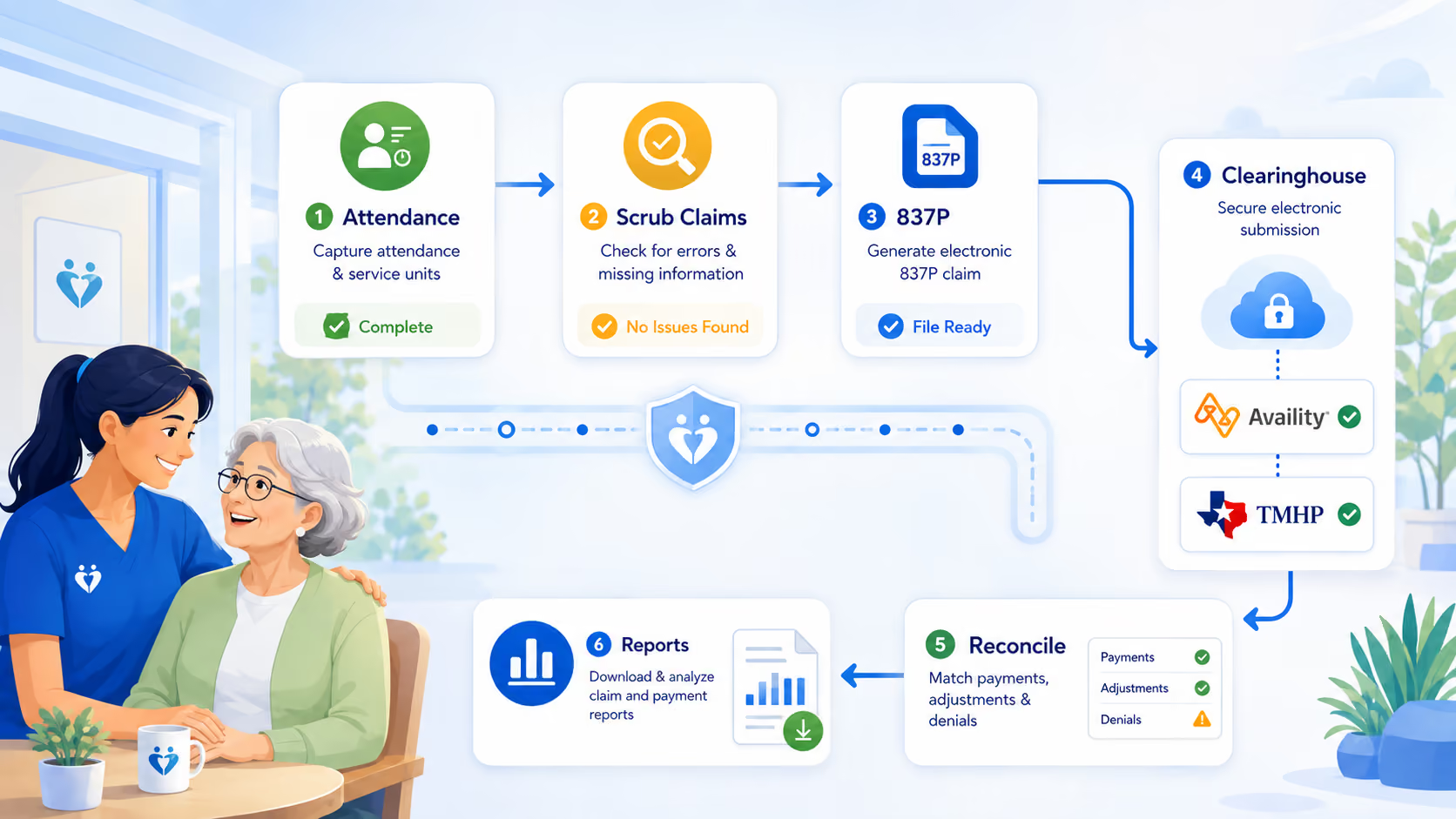
Adult day care billing starts with the services your center actually records. ElderSuite keeps the billing process organized in four numbered Claim Center steps.
Review Pending claims before submission. Scrub & Fix fills missing billing details from the client record and flags items that still need attention.
Select the payer, clearing house, service dates and clients. ElderSuite builds the 837P electronic claim file and uploads it through Availity or TMHP.
Download waiting clearinghouse and payer response files into ElderSuite, open them, and review what came back before making corrections.
Record claim outcomes against the service records. Use Reconcile Claims for batch status work and Auto Reconcile where the downloaded report supports it.
A claim belongs to an attendance record in ElderSuite. Saving Attendance & Transportation Records for a client on a service date creates that day's claim with a Pending status.
ElderSuite calculates units from the recorded pick-up and drop-off times using the participant's payment-type definitions. That keeps attendance, units of service and the claim connected without a separate “create claim” step.
See how attendance and transportation records work →Process Claims builds the 837P file in the background and uploads it to the selected supported clearing house. After a successful upload, the billed records are stamped with the batch control number and move from Pending to Submitted.
Your biller chooses the payer and clearing house for each run, sets the service dates, selects the clients, and clicks Process. ElderSuite gathers the matching Pending, error-free service records and prepares the electronic batch.
The current electronic billing workflow supports Availity and TMHP. ElderSuite prepares and transmits claims; the clearing house and payer remain responsible for processing and adjudication.
Read the Process Claims guide →ElderSuite supports two electronic clearing houses in the current workflow, with each used for the payers it serves.

Supported commercial insurers and managed-care organizations that accept claims through Availity can be submitted through the configured Availity clearing-house record.

Traditional Texas Medicaid / DAHS fee-for-service claims are submitted through TMHP for properly enrolled and configured Texas providers.
Current TMHP connectivity guidance →Texas DAHS-ISS: bill program providers by statement →Submission is only part of the billing job. In View Reports, staff can download available Availity or TMHP report files, store them in ElderSuite, and open them for review.
Where a supported report contains the required matching information, Auto Reconcile can help apply eligible claim-status updates. Manual Reconcile Claims remains available for batch status work.
Learn about Auto Reconcile →ElderSuite's billing workflow is connected to the operational records behind the claim rather than treated as a separate billing-only system.
These step-by-step guides show the same workflow in more detail for staff who need operating instructions.
Yes. Process Claims builds an 837P electronic claim file and uploads it through the supported clearing house selected for the billing run.
The current electronic billing workflow supports Availity and TMHP. They are not interchangeable; the provider must use the clearing house that serves the payer being billed.
Yes. A claim belongs to an Attendance & Transportation record for the client and service date. Saving attendance creates the Pending claim, and ElderSuite calculates units from the recorded times using the payment-type setup.
Yes. Traditional Texas Medicaid / DAHS fee-for-service claims are routed through TMHP for providers that are properly enrolled and configured for that billing relationship.
No. ElderSuite prepares and transmits claims, downloads response reports and supports reconciliation. The clearing house and payer handle claim processing and adjudication.
Try the full version of ElderSuite for 30 days. No credit card, no contract, and support is included.

