
Nutrition Center
Meal Records
Record the meals each client was served every day: by hand, calculated from attendance times, or scanned from paper meal count logs. ElderSuite counts those meals for the CACFP Claim for Reimbursement and the other nutrition reports.
Free for 30 days. Full version. No credit card required. No contracts.
What It Covers
Daily Meal Counts for the Food Program
Breakfast, Morning Snack, Lunch and Afternoon Snack for each client
Meals calculated from pick up and drop off times
Paper meal count forms scanned and read
Scanned logs kept on file for each week
A check for meals recorded without attendance times
Monthly claim, worksheet and weekly meal count reports
Recording Meals
Three Ways to Record the Day's Meals
Meal Records shows one service date with every client enrolled on that date and a check box for each of the four meal services. A center can use any of the three methods, or mix them.
By Hand
Check the meals each client was served and save the day. Change the date to enter or correct another day.
Calculate Meals
ElderSuite compares each client's pick up and drop off times with the center's meal serving times and checks the meals for review.
Scan Meals
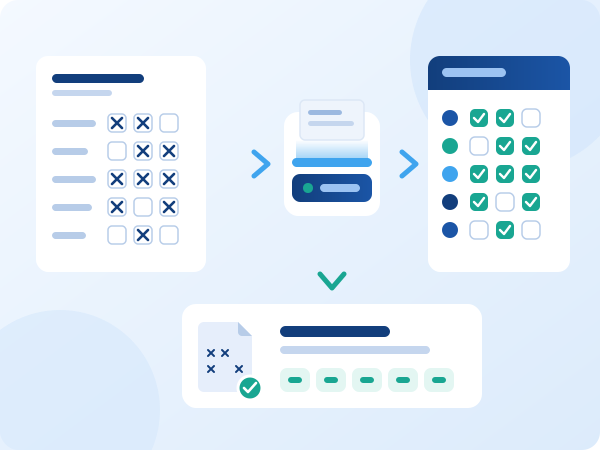
Scan a week of hand-marked paper meal count logs. ElderSuite reads the marks and records the whole week.
Scan Meals
From a Paper Form to Meal Records
ElderSuite prints the Daily Meal Count & Attendance form for one week, Monday through Friday, with fifteen participants on a page. It prints each participant's name and age and leaves the meal boxes empty. Staff mark each meal on paper at the time it is served.
At the end of the week, staff scan the pages in any order. ElderSuite sets the scanner to grayscale at 300 DPI. It reads the provider name, the date above each column and the participant name on each line, then measures each meal box. A page fed upside down is turned and read again.
Before anything is saved, ElderSuite shows what it read and asks for confirmation. Afterward a summary lists the days recorded, any mark that was hard to read, and any line or page that was left out, so staff know exactly what to check.
Scanned Logs
The Paper Log Is Kept With the Week
The marked paper log is the point of service record for the food program. When a scanned week is saved, ElderSuite sends the scanned pages to the ElderSuite Document Server and files them against that week.
View Scanned Log opens the pages from any weekday of that week, turned the way the paper reads. If a week is scanned more than once, every scan is kept and shown together. Scanned logs cannot be deleted from ElderSuite.
Which scanners work
Scan Meals works with scanners that have their driver software installed and with network scanners that support driverless scanning.
Meals and Attendance
Meals and Attendance Share One Daily Record
ElderSuite keeps each client's attendance times, meals and billing for a day on one record. Meal Records writes only the four meals. Times and billing stay with Attendance & Transportation Records.
Meals can be recorded before the times are entered. ElderSuite then creates the day's record with a Pending status, and Scrub Claims in the Claim Center shows that day as needing attention until the times are entered. Saving meals also updates any open Attendance & Transportation Records, Scrub Claims and Reconcile Claims windows.
Meals without attendance
A meal checked for a client who did not attend would still be counted on the claim. The Nutrition Center shows a notice when past days in the last 90 days have meals but no attendance times. Staff review each day and either enter the times or remove the meals. ElderSuite also lists these days when the claim is printed.
Reports
Meal Counts Ready for the Claim
Meal totals are never typed. ElderSuite counts them from the meals recorded for each client on each day and prints them on reports in the Report Center.
Claim for Reimbursement
The monthly CACFP claim at Site Level or Contracting Entity Level, with days of operation, total attendance, Free, Reduced and Paid participants, and the Breakfast, AM Snack, Lunch and PM Snack counts.
Claim for Reimbursement Worksheet
The count of each meal served on each day of the month, with the four monthly totals that support the claim.
Daily Meal Count & Attendance
The weekly record, printed blank for marking by hand or completed with the meals served and daily totals.
Daily Meal Production Record
Printed for a chosen date with the contracting entity, site and ID numbers filled in, ready for the kitchen to complete.
Attendance Calendar
A monthly attendance calendar for each client. Before it prints, ElderSuite lists any days that have meals recorded but no attendance times.
State Nutrition Portal
The Nutrition Center links to the food program website for the center's state, for all 50 states.
Access
Controlled Access and Protected Saves
Meal Records has its own permission, Edit Meal Records. An administrator grants it to Limited Access employees in Manage Employees.
If another employee changed one of the day's records after the window loaded it, ElderSuite does not overwrite that change. It tells the user, who then opens the day again.
Serving times
Calculate Meals uses the serving hours entered in Manage Meal Times. A meal the center does not serve is never counted by the calculation.
Scan This Week's Meal Logs During Your Trial
Record meals your way and print the claim from the same records. Free for 30 days. No credit card required.

